How I Keep Coding Agents Moving with a Stream Deck
It’s hardly news at this point, but running several coding agents at once creates a lot of cognitive load. I’m constantly checking whether agents have gotten stuck, hunting down pull requests to see what needs my review, and following up on feedback. I’m writing code faster, but more of my time and energy go to coordinating the software development lifecycle—what I think of as “SDLC air traffic control.”
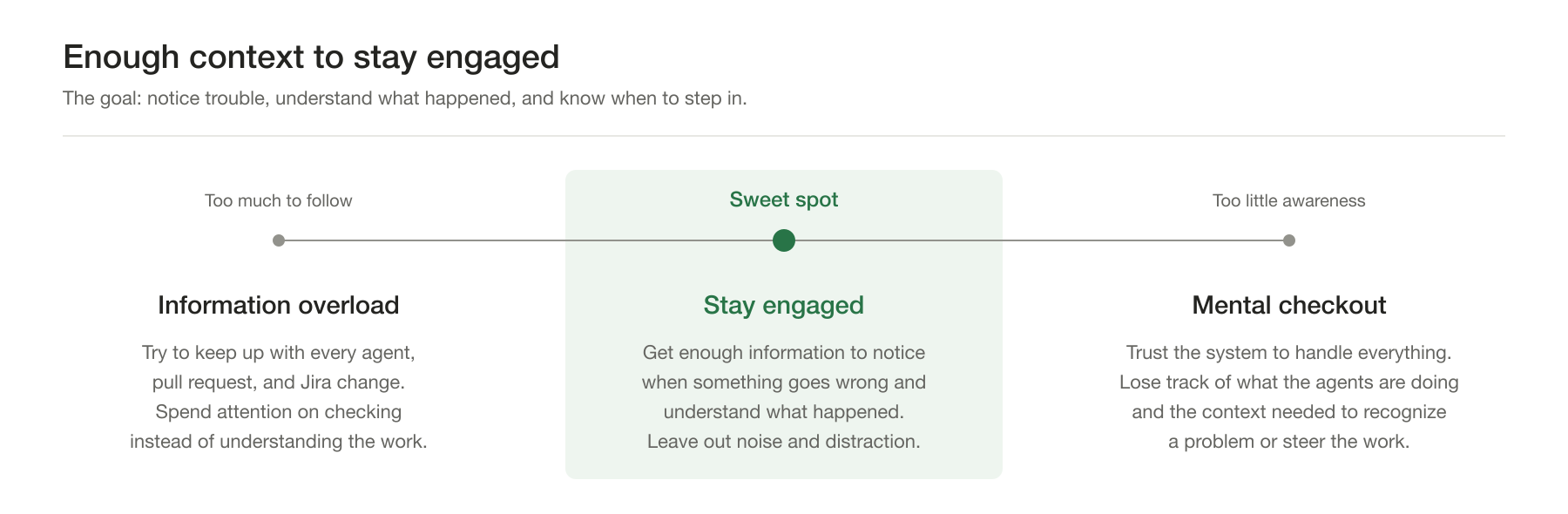
The hard part is finding the right level of involvement. Following every update leaves me buried in agents, pull requests, and Jira changes; trusting the system to handle everything leaves me without the context to recognize when it goes wrong. I want enough information to notice a problem and understand what happened, with a quick route back into the work when I need to steer it. Everything else adds noise and distraction.
I think of it like adding printfs while debugging. I add
output around the behavior I’m trying to understand, then dig deeper
where the results raise questions. I don’t need a trace of every
function that runs; I need the pieces that explain what happened and
where things went wrong. I want the same control over the information I
get from my agents, adding detail where it helps me understand the work
and ignoring the rest. With more happening at once, I have to be more
selective about what interrupts me.
That matters most when I switch tasks while the agents run. I might review one agent’s draft pull request (PR) while another implements a change and a third addresses comments from a human reviewer. By the time I return to the first conversation, I’ve lost some of the thread. Paging that context back in—which PR belongs to it, what I’ve reviewed, and where we put the notes—takes effort before I even get back to the code.
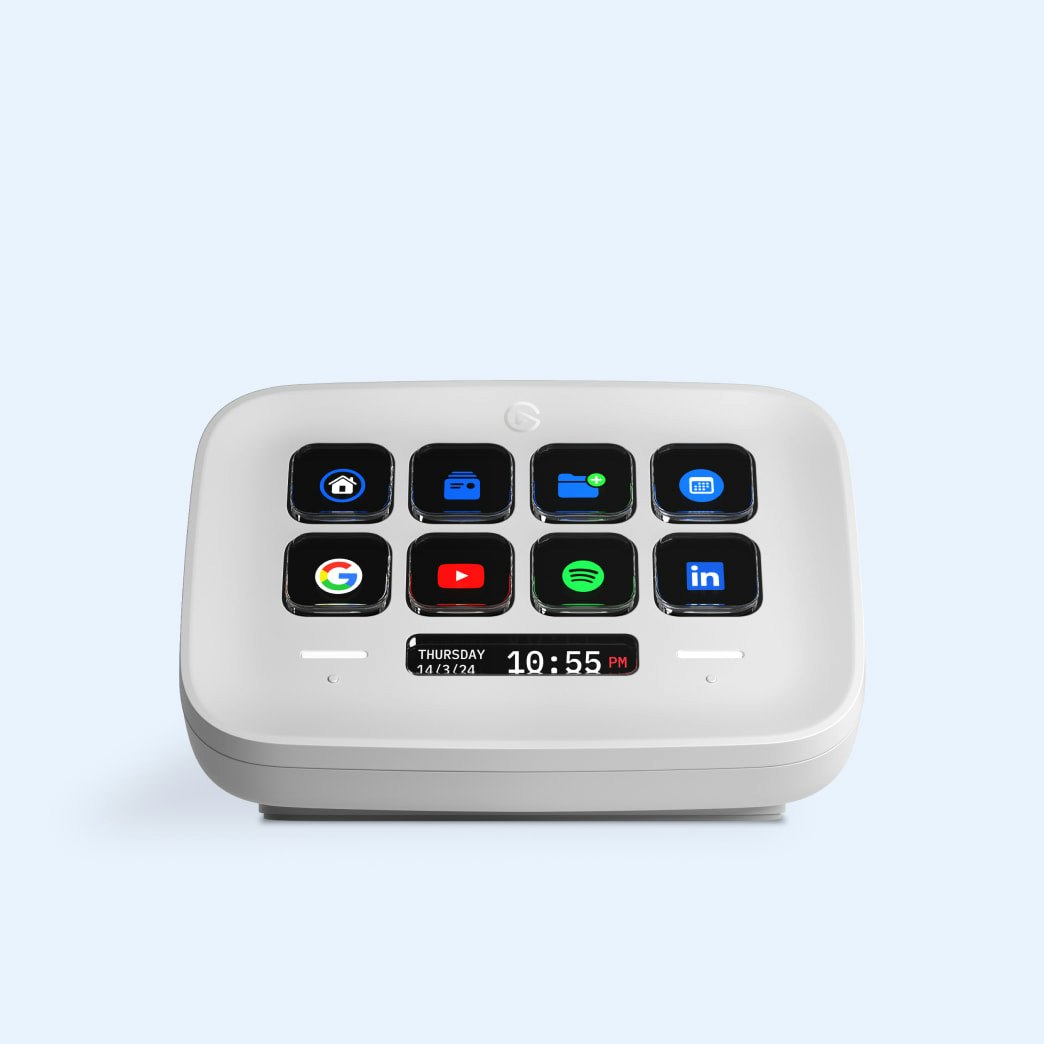
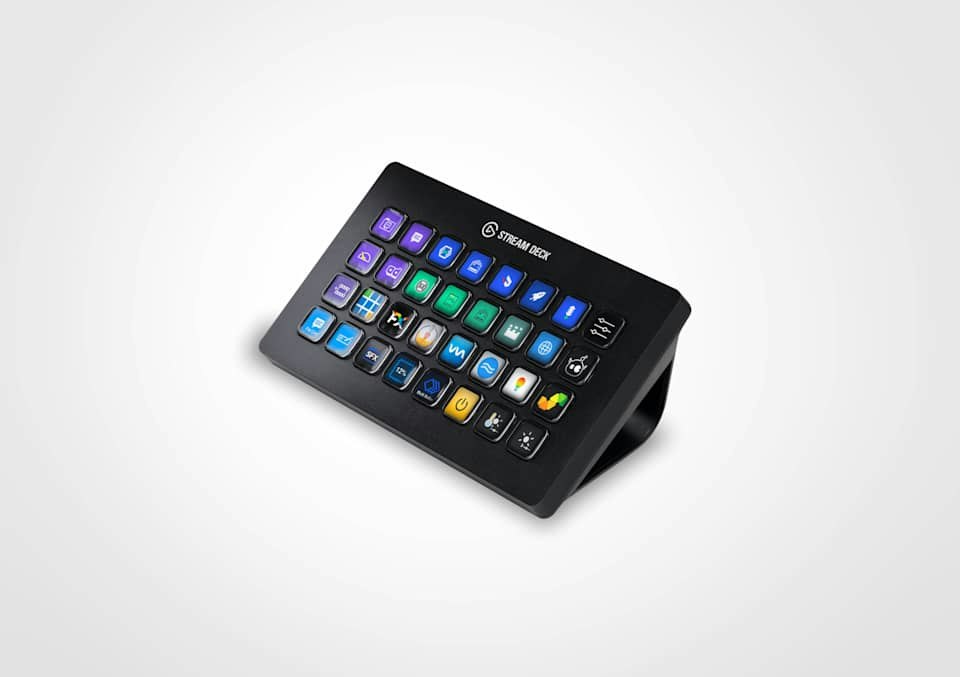
A couple of years ago, I bought a Stream Deck, a small desktop panel of physical buttons, each with its own tiny screen. I’m a sucker for hardware “that could be great,” and I figured I’d find all sorts of uses for it. Instead, it sat unused on my desk until last week, when I started using it to manage my agents.
 |
 |
|---|---|
| Stream Deck Neo · 8 buttons | Stream Deck XL · 32 buttons |
Software controls what each button shows and does, which makes Stream Decks popular with YouTube creators and livestreamers for switching scenes, controlling audio, and running broadcasts. I vibecoded notifier-deck to put those same buttons to work managing agents across planning, implementation, my own code review, human review, and merge.
Each task gets a button beside my keyboard, where a glance shows me what needs attention and a press takes me back to its conversation, code, or notes. Keeping those links and signals together helps me stay involved without constantly reopening every window to check on things.
Once I put the eight-button Stream Deck Neo to work, I ran out of buttons within a couple of days and upgraded to the XL with 32.
Using notifier-deck
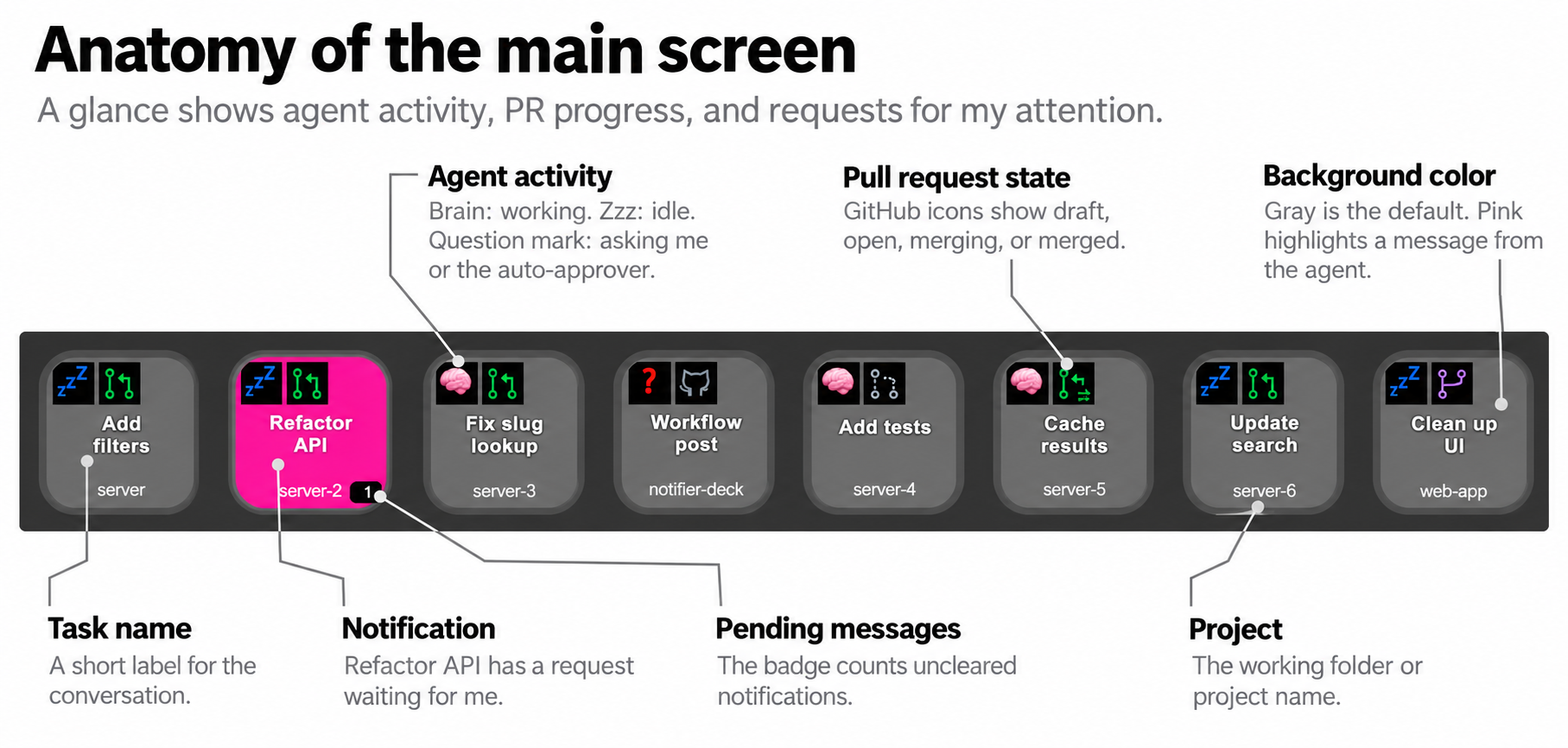
The main screen gives me an overview of the work before I decide where to spend my attention. I usually leave the deck on All Tasks, where the short names and project labels help me recognize each task. Most buttons start gray and stay out of the way until something changes. Red tells me the next step belongs to me; bright pink draws my attention to a message from the agent.
If I want to get a rough idea of what my agents are doing, I look at the activity icon in the upper left. A 🧠 tells me the agent is working, 💤 tells me it’s idle, and there are other indicators for edge cases that I might want to pay attention to. If there’s an associated PR, it’ll show me the status of that too.
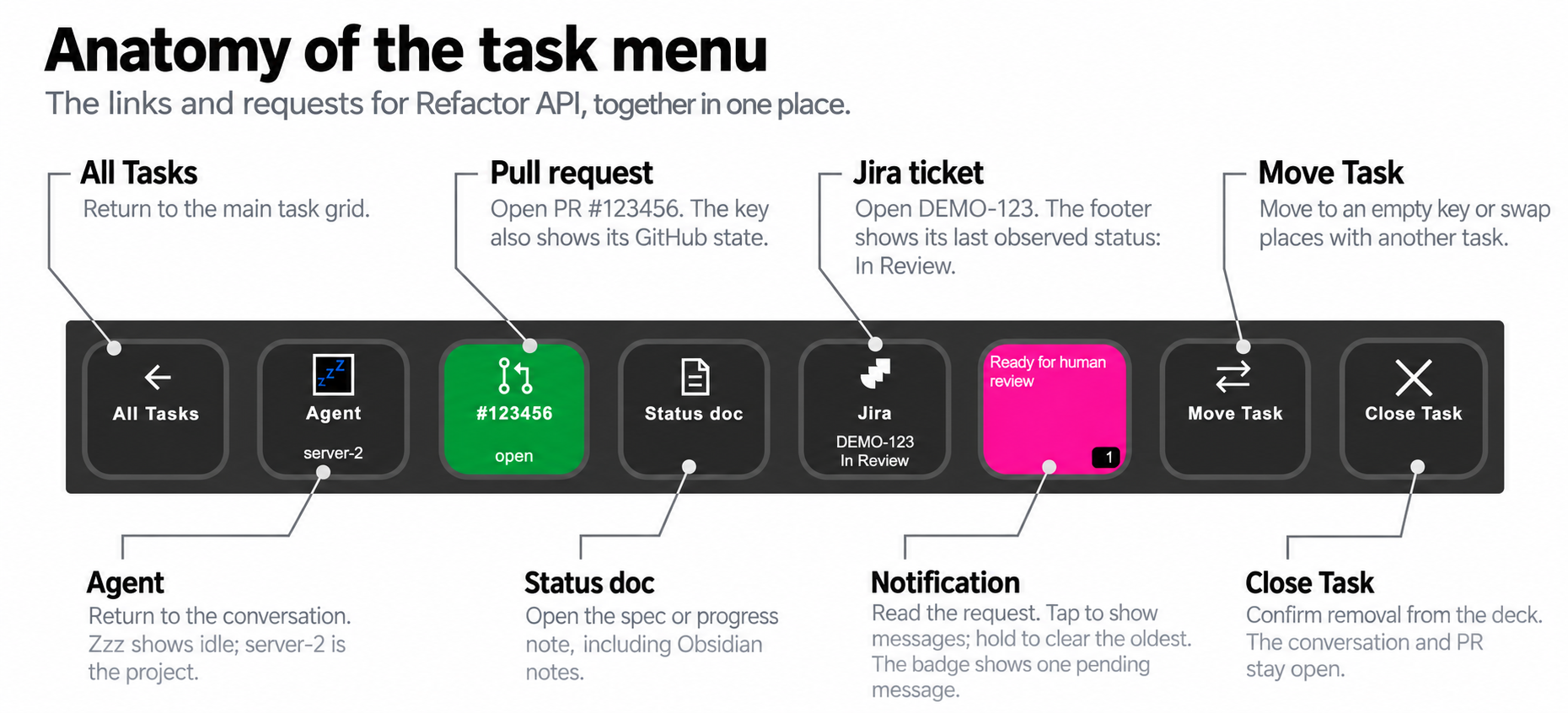 If I want to dig in a bit more on a task, I’ll hit that button to bring
up the task menu. I mostly do this when the task turns pink, meaning the
agent sent me a notification and needs me to do something.
If I want to dig in a bit more on a task, I’ll hit that button to bring
up the task menu. I mostly do this when the task turns pink, meaning the
agent sent me a notification and needs me to do something.
The task menu gives the the status of the agent, the PR, the Jira task, and any pending notifications from the agent. I can tap any of the buttons to jump to the agent conversation, PR, etc. Keeping those destinations together saves me from searching through a conversation for the link I need.
How notifier-deck works
The agent keeps the deck up to date as it works. To start, I ask it to register a button using a skill: a short set of written instructions that teaches it how to choose a label, attach its links, and keep the button ID for later updates. As the task progresses, the agent updates that same button rather than moving around the grid. After a while, I start to remember where each task lives.
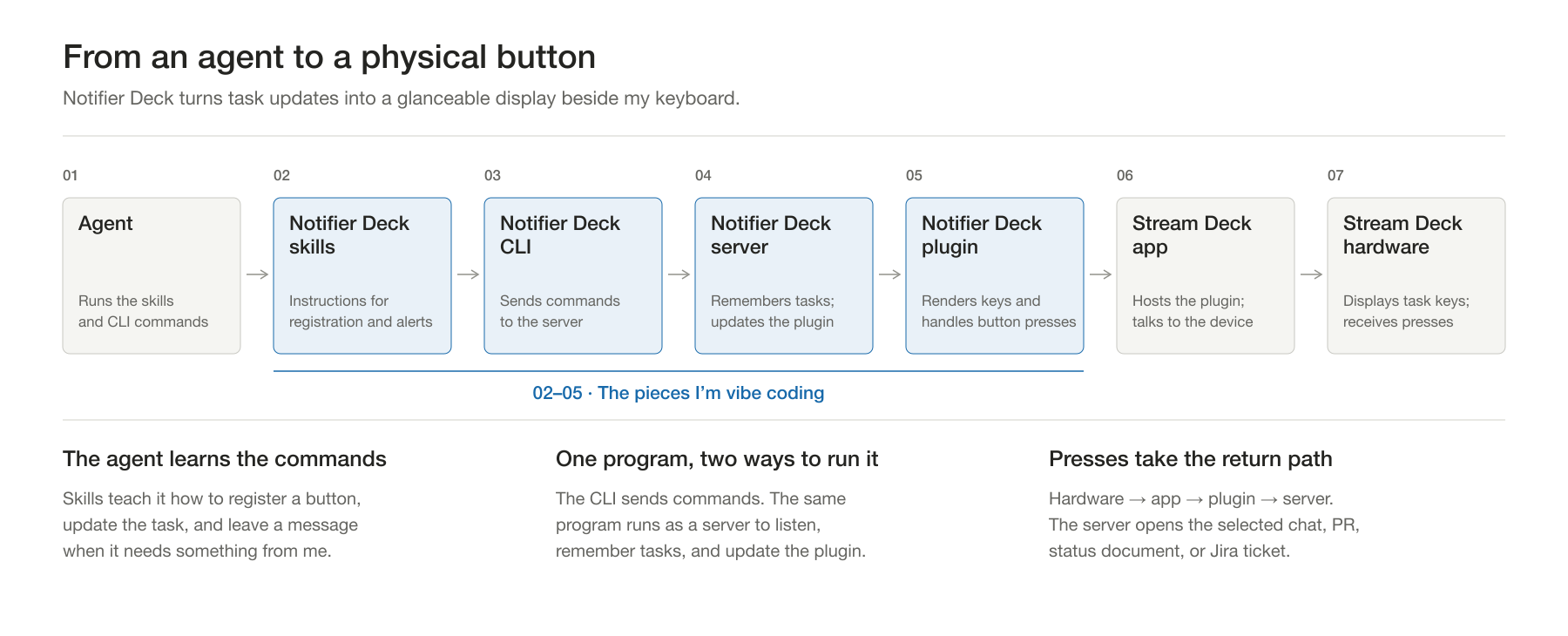
The blue boxes show the software I’m vibe coding to connect the agent to the deck. The skills teach the agent which commands to run, and the remaining pieces carry those updates through to the buttons. Coding agents are really good at writing the code for all this stuff. It’s fast and easy to ask it to tweak a feature or add a new one and start using it in minutes. I’ve rarely thought about the architecture after getting started. Instead, I just tell my agent what I want to improve.
Those commands go through the Notifier Deck command-line interface (CLI) to a server, a program I leave running to listen for updates and remember tasks. I run the same executable in both roles: as the server that listens and as the CLI that sends updates.
The server then passes changes to a plugin, an add-on I’ve written for the Stream Deck app, which draws the buttons. A button press follows the path back through the plugin and server to open the conversation or link on my computer.
Because the agent only needs to invoke commands, the skills work with Claude or another agent too. For routine activity updates, I use hooks: commands that the agent’s software runs automatically when work starts or stops. The agent supplies the task context and messages that tell me what it needs.
Tooling that evolves with me
The part I like most is that I keep changing this system as I use it. Each improvement starts with something that gets in my way, which gives me a much clearer starting point than trying to design the whole workflow in advance.
I tried that at first, drawing a big state diagram of how I develop software, but the branches quickly got out of hand. I quickly realized I make a lot of those calls by intuition, and trying to fit them all into a rigid structure became its own project.
Building notifier-deck feels more like playing with Magna-Tiles with my kids. We start building, see what works, and add another piece. When something falls apart, we put it back together differently, and working with what we’ve built gives us the idea for what to try next.
The notifications grew out of that kind of tinkering. Once I had a quick way back into each task, I noticed that I was now spending a lot of time polling to see when I needed to step in. I could eventually see when agents were idle, but I wouldn’t always see it right away. And sometimes I’d want the agent to check in with me without stopping to wait for my feedback.
This prompted me to add a “notify-me” skill. At first, it just turned
that task’s button pink, and I’d jump to the agent and piece together
why it wanted my attention. That got annoying after a few times, so I
then added support for putting a (very tiny) message on the button. Now
I don’t need to dig through the agent conversation. It’s basically
printf for agents.
Nothing about this system is perfect, and it’s constantly evolving. The notification text is crazy tiny and almost impossible to read. But after I use it a few more times, I’ll have a better sense of how the notifications should work, and I can tweak it again.
The Stream Deck is just the surface I chose for this. An extra touchscreen or iPad hooked up to my computer would probably work just as well, with more room for messages and flexible layouts. The physical buttons suit me today; if I outgrow them, I’ll try something else. The important thing is that I’m trying new things, constantly improving, and not getting stuck on finding the perfect solution. If notifier-deck didn’t change by next month, that’d be a big fail on my part.
I don’t have to fit how I work into a rigid system that anticipates everyone’s needs. When something gets in my way, I build a small change and try it. Anyone’s welcome to use this tool, and I’m happy to share it! Given how cheap it is to improve it, it only needs to help me to be worth the effort.